Elite Soccer Tactic Board1.11
Publisher Description



Elite Soccer Club is the premiere way for coaches to share their plays, defenses, set pieces, tactics and more with their players, managers and coaching staff. Create training plans you can run interactively, print out and add your own drills. Share lineups with our lineup sharing feature. We have full support for youth soccer teams all the way to the pros. Add in your team's roster, customize the pitch and then start recording videos that you can share anywhere. Or, you can AirPlay straight to your team's TV to explain concepts better than ever before during team meetings. Plus, we have a plain, digital whiteboard for situations where you want to draw something up quickly.
-- Elite Soccer Club Features --
. Record videos breaking down your concepts, drills and more and share them anywhere.
. Create training plans you can print or run from your device.
. Use our AI practice builder to create the best practice plan based off your team's needs.
. Use lineup sharing to create beautiful graphics of your team's lineup.
. Quickly print or share images from your whiteboard to share one-off concepts.
. Support for multiple team sizes: 3v3, 4v4, 5v5, 7v7, 9v9 and 11v11.
. Show your actual lineup where they should be on the field.
. Explain tactics before games with unmatched details by using your actual players on the field.
. Customizable field:
⤍ Change field styles.
⤍ Editable boundary line colors.
. Quickly add an opposing team to demonstrate tactics and concepts.
. Edit your marker shape, color, use highlighters and more.
. Teams support:
⤍ Add in as many teams as you coach - perfect for travel clubs.
⤍ Add your full team roster with their jersey number and name.
⤍ Use your team's colors.
. Sub players in and out, full bench support.
. Full Apple Pencil support. Draw directly on your board, move players around and more.
. AirPlay: Cast your whiteboard on a television to teach the whole team at once.
-- LEGAL --
. View our terms of service here: https://www.apple.com/legal/internet-services/itunes/dev/stdeula/
. View our privacy policy here: https://www.elitefootballclubapp.com/privacy
Subscriptions will be charged to your credit card through your iTunes account. Your subscription will automatically renew unless canceled at least 24 hours before the end of the current period. You will not be able to cancel the subscription once activated. Manage your subscriptions in Account Settings after purchase.
Version History Version 1.11 is our biggest update yet, with a brand-new Match Mode and a fresh new look.
NEW: MATCH MODE
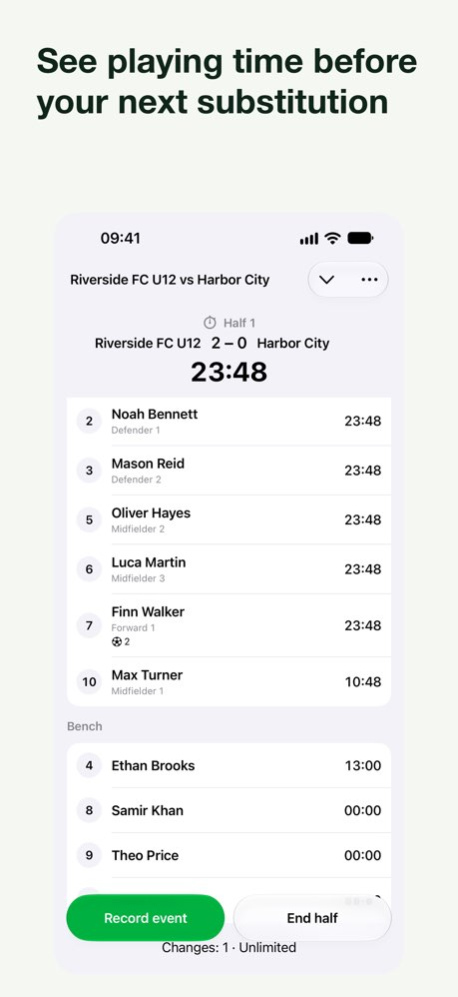
• Run your match from the sideline: live timer, substitutions and break reminders
• Record goals (with scorer), opponent goals, yellow and red cards and injuries as they happen
• Live score, and players grouped by on the field, bench and absent
• Celebrate goals with team-color confetti
• Get a match report with score, playing time and a full timeline, and share it as a PDF in one tap
• Match history is included in your backups
A FRESH NEW LOOK
• A redesigned team hub in your team's kit colors, with your roster, tactical boards, lineups and matches in one place
• Team colors now show up in lineups, tactical boards and match starting lineups
• Cleaner cards, empty states and toolbars throughout, with native glass buttons
• Layouts that adapt to resizable windows and larger screens
TEAMS, LINEUPS & TACTICAL BOARDS
• Import your roster from a CSV file
• Add placeholder players to tactical boards before your roster is ready
• Rotate the pitch on tactical boards
• New defensive and attacking 4-3-3 formations
• Changing formation keeps your starters in place, and lineup pickers are sorted by position
• Safer delete and clear actions for cards and lineups
SMART PRACTICE
• Smarter practice plans with up to 12 drills and a clear rationale for every plan
• On supported devices, plans can now be generated using Private Compute Cloud
• Generation keeps running in the background
PRACTICES, EVERYWHERE
• Run your practice from a Live Activity on the Lock Screen and Dynamic Island, with drill progress at a glance
• Find drills, teams and players from Spotlight, Siri and Shortcuts
• Choose from more app icons in Settings
COACH'S CORNER
• Message the developer straight from Settings, by text or voice note, and get replies as notifications
• Vote on and suggest new features on our request board 1.11 Sep 30 Ready for iOS 27, with smarter ways to plan and run your next practice.
Smart Practice now uses Apple Private Cloud Compute on compatible iOS 27 devices. Create sessions tailored to your team age, ability and training goals using drills from the library and your own collection.
Generated plans now explain why each drill was selected, helping you understand how it supports your team goals.
Live Activities let you follow practice timers and control your session from the Lock Screen and Dynamic Island.
This release also improves drill search, accessibility and localization. Player assignments now stay intact when you switch formations.
Private Cloud Compute practice generation currently supports English drills and requires Apple Intelligence availability.
Minor bug fixes.
Lineups now include more formations, including 4-3-3 with a holding midfielder and 4-2-1-3. 1.10.2 Sep 14 Ready for iOS 27, with smarter ways to plan and run your next practice.
Smart Practice now uses Apple Private Cloud Compute on compatible iOS 27 devices. Create sessions tailored to your team age, ability and training goals using drills from the library and your own collection.
Generated plans now explain why each drill was selected, helping you understand how it supports your team goals.
Live Activities let you follow practice timers and control your session from the Lock Screen and Dynamic Island.
This release also improves drill search, accessibility and localization. Player assignments now stay intact when you switch formations.
Private Cloud Compute practice generation currently supports English drills and requires Apple Intelligence availability.
Minor bug fixes. 1.10.1 Sep 12 Ready for iOS 27, with smarter ways to plan and run your next practice.
Smart Practice now uses Apple Private Cloud Compute on compatible iOS 27 devices. Create sessions tailored to your team age, ability and training goals using drills from the library and your own collection.
Generated plans now explain why each drill was selected, helping you understand how it supports your team goals.
Live Activities let you follow practice timers and control your session from the Lock Screen and Dynamic Island.
This release also improves drill search, accessibility and localization. Player assignments now stay intact when you switch formations.
Private Cloud Compute practice generation currently supports English drills and requires Apple Intelligence availability. 1.10 Sep 11 Enjoy clearer translations and a smoother feedback flow that makes it easier to share suggestions and report issues. 1.9.4 Aug 24 Fixed a rare crash that could happen after you close the app, improving stability so you can exit smoothly. 1.9.3 Aug 6 Fixed a rare crash that could happen after you close the app, improving stability so you can exit smoothly. 1.9.2 Jul 9 Fixed a rare crash that could happen after you close the app, improving stability so you can exit smoothly. 1.9.1 Jun 18 Smart Training is now smoother and faster. When you start a new session, you can choose Smart Training or Manual Training, and generated trainings open right away as soon as they’re ready.
We also improved practice management. Delete confirmations are clearer, and you can now delete a saved practice directly from its detail view. 1.9 Jun 13 Version 1.8 expands Elite Football Club for more coaches with:
- Better match view on iPad: Fixed a pitch issue so when you rotate your device, players and opponents stay in the correct positions instead of shifting.
- More drill options in more languages: Added Italian and Portuguese support, including localized stock drills so you can train in your native language.
- Clearer communication: Improved translations throughout the app and refined plural wording for smoother, more accurate text in every section. 1.8 May 28 You can now create 9v9 player lineups, making it easier to set up matches for youth teams. Build complete squads with the right player distribution in just a few steps. 1.7 May 23 This update fixes minor bugs and improves app performance. 1.6.1 May 18 New onboarding flow gets you to your first team faster, with clearer steps from start to finish.
Quick Add now creates starter rosters that match your team size automatically, so you can begin training and matches right away.
Pitch placement is smarter by default: player and opponent positions are arranged more naturally, making your lineup easier to read and adjust.
Training setup is smoother and faster. You’ll see clearer empty states when your training plan isn’t set up yet, plus quicker access to creating your plan.
Team creation is clearer, too. Updated wording helps prevent accidentally creating an empty team.
Plus general copy improvements, localization updates, and stability fixes. 1.6 May 10 5v5 & 7v7 Team Support: Easily plan and organize lineups for smaller-sided games with formations specifically designed for 5-a-side and 7-a-side matches. Save your favorite lineups for quick and easy access during game time.
Customizable Player Labels: Personalize how player names appear on the field by selecting from first name, last name, full name, or position. Instantly preview your choices in the settings for a tailored experience.
Enhanced Lineup Management: Enjoy a more efficient way to create, edit, and organize your lineup assignments with our new dedicated views and streamlined interface.
More Languages: Now supporting Italian and Portuguese, our app is available in 7 languages, making it easier for more users to enjoy.
Smoother Experience: Benefit from refined animations, improved empty states, and a more reliable rating prompt for a seamless user experience. 1.5 Mar 20 Experience enhanced performance and reliability with our latest update, featuring minor fixes and improvements designed to optimize your app experience. Enjoy smoother navigation and increased stability, ensuring you get the most out of every use. 1.4 Jan 28 Big Update:
- Experience AI-powered training generation now available in four languages: English, German, French, and Spanish. More languages are on the way, ensuring you can train effectively in your preferred language.
- Enjoy enhanced player roster, lineup, and formation management, making it easier than ever to organize and strategize your team.
- Benefit from a range of UI and performance improvements for a smoother and more responsive app experience.
We value your feedback and look forward to hearing from you! 1.3 Jan 12 MAJOR update:
- All new practice planner.
- Drill library to create and save your own drills.
- AI practice builder.
- Lineup image sharing.
- Print practices as .pdfs or run them from your device.
- Video recording bug fix where some buttons may not be tappable. 1.2.1 12/01/2025 MAJOR update:
- All new practice planner.
- Drill library to create and save your own drills.
- AI practice builder.
- Lineup image sharing.
- Print practices as .pdfs or run them from your device. 1.2.0 11/01/2025 Add avatars to players.
Bug fixes. 1.1.0 02/22/2025 - Bug fixes
- Dark mode and tinted icon support
- Green icon
- Smoother player movement when dragging
- A little grabber will show below the player is the soccer ball is over them, making it easier to move
- Fixed bug where dragging a player would open its player options 1.0.4 09/12/2024 Optimizations and bug fixes. 1.0.3 05/06/2024 Fixes!
- Several dark mode fixes.
- Addressed buttons not responding when done recording videos.
- Fixed the thumbnail image when renaming your team. 1.0.2 04/11/2024 Added link for Elite Hoops Basketball. 1.0.1 04/11/2024 1.0 03/28/2024
About Elite Soccer Tactic Board
The company that develops Elite Soccer Tactic Board is Fifteen Jugglers Software UG. The latest version released by its developer is 1.11.
To install Elite Soccer Tactic Board on your iOS device, just click the green Continue To App button above to start the installation process. The app is listed on our website since 2026-10-14 and was downloaded 0 times. We have already checked if the download link is safe, however for your own protection we recommend that you scan the downloaded app with your antivirus. Your antivirus may detect the Elite Soccer Tactic Board as malware if the download link is broken.
How to install Elite Soccer Tactic Board on your iOS device:
- Click on the Continue To App button on our website. This will redirect you to the App Store.
- Once the Elite Soccer Tactic Board is shown in the iTunes listing of your iOS device, you can start its download and installation. Tap on the GET button to the right of the app to start downloading it.
- If you are not logged-in the iOS appstore app, you'll be prompted for your your Apple ID and/or password.
- After Elite Soccer Tactic Board is downloaded, you'll see an INSTALL button to the right. Tap on it to start the actual installation of the iOS app.
- Once installation is finished you can tap on the OPEN button to start it. Its icon will also be added to your device home screen.
Program Details
System requirements
Download information
Pricing
Version History
version 1.11
posted on 2026-10-14
Version History Version 1.11 is our biggest update yet, with a brand-new Match Mode and a fresh new look.
NEW: MATCH MODE
• Run your match from the sideline: live timer, substitutions and break reminders
• Record goals (with scorer), opponent goals, yellow and red cards and injuries as they happen
• Live score, and players grouped by on the field, bench and absent
• Celebrate goals with team-color confetti
• Get a match report with score, playing time and a full timeline, and share it as a PDF in one tap
• Match history is included in your backups
A FRESH NEW LOOK
• A redesigned team hub in your team's kit colors, with your roster, tactical boards, lineups and matches in one place
• Team colors now show up in lineups, tactical boards and match starting lineups
• Cleaner cards, empty states and toolbars throughout, with native glass buttons
• Layouts that adapt to resizable windows and larger screens
TEAMS, LINEUPS & TACTICAL BOARDS
• Import your roster from a CSV file
• Add placeholder players to tactical boards before your roster is ready
• Rotate the pitch on tactical boards
• New defensive and attacking 4-3-3 formations
• Changing formation keeps your starters in place, and lineup pickers are sorted by position
• Safer delete and clear actions for cards and lineups
SMART PRACTICE
• Smarter practice plans with up to 12 drills and a clear rationale for every plan
• On supported devices, plans can now be generated using Private Compute Cloud
• Generation keeps running in the background
PRACTICES, EVERYWHERE
• Run your practice from a Live Activity on the Lock Screen and Dynamic Island, with drill progress at a glance
• Find drills, teams and players from Spotlight, Siri and Shortcuts
• Choose from more app icons in Settings
COACH'S CORNER
• Message the developer straight from Settings, by text or voice note, and get replies as notifications
• Vote on and suggest new features on our request board 1.11 Sep 30 Ready for iOS 27, with smarter ways to plan and run your next practice.
Smart Practice now uses Apple Private Cloud Compute on compatible iOS 27 devices. Create sessions tailored to your team age, ability and training goals using drills from the library and your own collection.
Generated plans now explain why each drill was selected, helping you understand how it supports your team goals.
Live Activities let you follow practice timers and control your session from the Lock Screen and Dynamic Island.
This release also improves drill search, accessibility and localization. Player assignments now stay intact when you switch formations.
Private Cloud Compute practice generation currently supports English drills and requires Apple Intelligence availability.
Minor bug fixes.
Lineups now include more formations, including 4-3-3 with a holding midfielder and 4-2-1-3. 1.10.2 Sep 14 Ready for iOS 27, with smarter ways to plan and run your next practice.
Smart Practice now uses Apple Private Cloud Compute on compatible iOS 27 devices. Create sessions tailored to your team age, ability and training goals using drills from the library and your own collection.
Generated plans now explain why each drill was selected, helping you understand how it supports your team goals.
Live Activities let you follow practice timers and control your session from the Lock Screen and Dynamic Island.
This release also improves drill search, accessibility and localization. Player assignments now stay intact when you switch formations.
Private Cloud Compute practice generation currently supports English drills and requires Apple Intelligence availability.
Minor bug fixes. 1.10.1 Sep 12 Ready for iOS 27, with smarter ways to plan and run your next practice.
Smart Practice now uses Apple Private Cloud Compute on compatible iOS 27 devices. Create sessions tailored to your team age, ability and training goals using drills from the library and your own collection.
Generated plans now explain why each drill was selected, helping you understand how it supports your team goals.
Live Activities let you follow practice timers and control your session from the Lock Screen and Dynamic Island.
This release also improves drill search, accessibility and localization. Player assignments now stay intact when you switch formations.
Private Cloud Compute practice generation currently supports English drills and requires Apple Intelligence availability. 1.10 Sep 11 Enjoy clearer translations and a smoother feedback flow that makes it easier to share suggestions and report issues. 1.9.4 Aug 24 Fixed a rare crash that could happen after you close the app, improving stability so you can exit smoothly. 1.9.3 Aug 6 Fixed a rare crash that could happen after you close the app, improving stability so you can exit smoothly. 1.9.2 Jul 9 Fixed a rare crash that could happen after you close the app, improving stability so you can exit smoothly. 1.9.1 Jun 18 Smart Training is now smoother and faster. When you start a new session, you can choose Smart Training or Manual Training, and generated trainings open right away as soon as they’re ready.
We also improved practice management. Delete confirmations are clearer, and you can now delete a saved practice directly from its detail view. 1.9 Jun 13 Version 1.8 expands Elite Football Club for more coaches with:
- Better match view on iPad: Fixed a pitch issue so when you rotate your device, players and opponents stay in the correct positions instead of shifting.
- More drill options in more languages: Added Italian and Portuguese support, including localized stock drills so you can train in your native language.
- Clearer communication: Improved translations throughout the app and refined plural wording for smoother, more accurate text in every section. 1.8 May 28 You can now create 9v9 player lineups, making it easier to set up matches for youth teams. Build complete squads with the right player distribution in just a few steps. 1.7 May 23 This update fixes minor bugs and improves app performance. 1.6.1 May 18 New onboarding flow gets you to your first team faster, with clearer steps from start to finish.
Quick Add now creates starter rosters that match your team size automatically, so you can begin training and matches right away.
Pitch placement is smarter by default: player and opponent positions are arranged more naturally, making your lineup easier to read and adjust.
Training setup is smoother and faster. You’ll see clearer empty states when your training plan isn’t set up yet, plus quicker access to creating your plan.
Team creation is clearer, too. Updated wording helps prevent accidentally creating an empty team.
Plus general copy improvements, localization updates, and stability fixes. 1.6 May 10 5v5 & 7v7 Team Support: Easily plan and organize lineups for smaller-sided games with formations specifically designed for 5-a-side and 7-a-side matches. Save your favorite lineups for quick and easy access during game time.
Customizable Player Labels: Personalize how player names appear on the field by selecting from first name, last name, full name, or position. Instantly preview your choices in the settings for a tailored experience.
Enhanced Lineup Management: Enjoy a more efficient way to create, edit, and organize your lineup assignments with our new dedicated views and streamlined interface.
More Languages: Now supporting Italian and Portuguese, our app is available in 7 languages, making it easier for more users to enjoy.
Smoother Experience: Benefit from refined animations, improved empty states, and a more reliable rating prompt for a seamless user experience. 1.5 Mar 20 Experience enhanced performance and reliability with our latest update, featuring minor fixes and improvements designed to optimize your app experience. Enjoy smoother navigation and increased stability, ensuring you get the most out of every use. 1.4 Jan 28 Big Update:
- Experience AI-powered training generation now available in four languages: English, German, French, and Spanish. More languages are on the way, ensuring you can train effectively in your preferred language.
- Enjoy enhanced player roster, lineup, and formation management, making it easier than ever to organize and strategize your team.
- Benefit from a range of UI and performance improvements for a smoother and more responsive app experience.
We value your feedback and look forward to hearing from you! 1.3 Jan 12 MAJOR update:
- All new practice planner.
- Drill library to create and save your own drills.
- AI practice builder.
- Lineup image sharing.
- Print practices as .pdfs or run them from your device.
- Video recording bug fix where some buttons may not be tappable. 1.2.1 12/01/2025 MAJOR update:
- All new practice planner.
- Drill library to create and save your own drills.
- AI practice builder.
- Lineup image sharing.
- Print practices as .pdfs or run them from your device. 1.2.0 11/01/2025 Add avatars to players.
Bug fixes. 1.1.0 02/22/2025 - Bug fixes
- Dark mode and tinted icon support
- Green icon
- Smoother player movement when dragging
- A little grabber will show below the player is the soccer ball is over them, making it easier to move
- Fixed bug where dragging a player would open its player options 1.0.4 09/12/2024 Optimizations and bug fixes. 1.0.3 05/06/2024 Fixes!
- Several dark mode fixes.
- Addressed buttons not responding when done recording videos.
- Fixed the thumbnail image when renaming your team. 1.0.2 04/11/2024 Added link for Elite Hoops Basketball. 1.0.1 04/11/2024 1.0 03/28/2024
version 1.11
posted on 2026-10-06
Version History Version 1.11 is our biggest update yet, with a brand-new Match Mode and a fresh new look.
NEW: MATCH MODE
• Run your match from the sideline: live timer, substitutions and break reminders
• Record goals (with scorer), opponent goals, yellow and red cards and injuries as they happen
• Live score, and players grouped by on the field, bench and absent
• Celebrate goals with team-color confetti
• Get a match report with score, playing time and a full timeline, and share it as a PDF in one tap
• Match history is included in your backups
A FRESH NEW LOOK
• A redesigned team hub in your team's kit colors, with your roster, tactical boards, lineups and matches in one place
• Team colors now show up in lineups, tactical boards and match starting lineups
• Cleaner cards, empty states and toolbars throughout, with native glass buttons
• Layouts that adapt to resizable windows and larger screens
TEAMS, LINEUPS & TACTICAL BOARDS
• Import your roster from a CSV file
• Add placeholder players to tactical boards before your roster is ready
• Rotate the pitch on tactical boards
• New defensive and attacking 4-3-3 formations
• Changing formation keeps your starters in place, and lineup pickers are sorted by position
• Safer delete and clear actions for cards and lineups
SMART PRACTICE
• Smarter practice plans with up to 12 drills and a clear rationale for every plan
• On supported devices, plans can now be generated using Private Compute Cloud
• Generation keeps running in the background
PRACTICES, EVERYWHERE
• Run your practice from a Live Activity on the Lock Screen and Dynamic Island, with drill progress at a glance
• Find drills, teams and players from Spotlight, Siri and Shortcuts
• Choose from more app icons in Settings
COACH'S CORNER
• Message the developer straight from Settings, by text or voice note, and get replies as notifications
• Vote on and suggest new features on our request board 1.11 6d ago Ready for iOS 27, with smarter ways to plan and run your next practice.
Smart Practice now uses Apple Private Cloud Compute on compatible iOS 27 devices. Create sessions tailored to your team age, ability and training goals using drills from the library and your own collection.
Generated plans now explain why each drill was selected, helping you understand how it supports your team goals.
Live Activities let you follow practice timers and control your session from the Lock Screen and Dynamic Island.
This release also improves drill search, accessibility and localization. Player assignments now stay intact when you switch formations.
Private Cloud Compute practice generation currently supports English drills and requires Apple Intelligence availability.
Minor bug fixes.
Lineups now include more formations, including 4-3-3 with a holding midfielder and 4-2-1-3. 1.10.2 Sep 14 Ready for iOS 27, with smarter ways to plan and run your next practice.
Smart Practice now uses Apple Private Cloud Compute on compatible iOS 27 devices. Create sessions tailored to your team age, ability and training goals using drills from the library and your own collection.
Generated plans now explain why each drill was selected, helping you understand how it supports your team goals.
Live Activities let you follow practice timers and control your session from the Lock Screen and Dynamic Island.
This release also improves drill search, accessibility and localization. Player assignments now stay intact when you switch formations.
Private Cloud Compute practice generation currently supports English drills and requires Apple Intelligence availability.
Minor bug fixes. 1.10.1 Sep 12 Ready for iOS 27, with smarter ways to plan and run your next practice.
Smart Practice now uses Apple Private Cloud Compute on compatible iOS 27 devices. Create sessions tailored to your team age, ability and training goals using drills from the library and your own collection.
Generated plans now explain why each drill was selected, helping you understand how it supports your team goals.
Live Activities let you follow practice timers and control your session from the Lock Screen and Dynamic Island.
This release also improves drill search, accessibility and localization. Player assignments now stay intact when you switch formations.
Private Cloud Compute practice generation currently supports English drills and requires Apple Intelligence availability. 1.10 Sep 11 Enjoy clearer translations and a smoother feedback flow that makes it easier to share suggestions and report issues. 1.9.4 Aug 24 Fixed a rare crash that could happen after you close the app, improving stability so you can exit smoothly. 1.9.3 Aug 6 Fixed a rare crash that could happen after you close the app, improving stability so you can exit smoothly. 1.9.2 Jul 9 Fixed a rare crash that could happen after you close the app, improving stability so you can exit smoothly. 1.9.1 Jun 18 Smart Training is now smoother and faster. When you start a new session, you can choose Smart Training or Manual Training, and generated trainings open right away as soon as they’re ready.
We also improved practice management. Delete confirmations are clearer, and you can now delete a saved practice directly from its detail view. 1.9 Jun 13 Version 1.8 expands Elite Football Club for more coaches with:
- Better match view on iPad: Fixed a pitch issue so when you rotate your device, players and opponents stay in the correct positions instead of shifting.
- More drill options in more languages: Added Italian and Portuguese support, including localized stock drills so you can train in your native language.
- Clearer communication: Improved translations throughout the app and refined plural wording for smoother, more accurate text in every section. 1.8 May 28 You can now create 9v9 player lineups, making it easier to set up matches for youth teams. Build complete squads with the right player distribution in just a few steps. 1.7 May 23 This update fixes minor bugs and improves app performance. 1.6.1 May 18 New onboarding flow gets you to your first team faster, with clearer steps from start to finish.
Quick Add now creates starter rosters that match your team size automatically, so you can begin training and matches right away.
Pitch placement is smarter by default: player and opponent positions are arranged more naturally, making your lineup easier to read and adjust.
Training setup is smoother and faster. You’ll see clearer empty states when your training plan isn’t set up yet, plus quicker access to creating your plan.
Team creation is clearer, too. Updated wording helps prevent accidentally creating an empty team.
Plus general copy improvements, localization updates, and stability fixes. 1.6 May 10 5v5 & 7v7 Team Support: Easily plan and organize lineups for smaller-sided games with formations specifically designed for 5-a-side and 7-a-side matches. Save your favorite lineups for quick and easy access during game time.
Customizable Player Labels: Personalize how player names appear on the field by selecting from first name, last name, full name, or position. Instantly preview your choices in the settings for a tailored experience.
Enhanced Lineup Management: Enjoy a more efficient way to create, edit, and organize your lineup assignments with our new dedicated views and streamlined interface.
More Languages: Now supporting Italian and Portuguese, our app is available in 7 languages, making it easier for more users to enjoy.
Smoother Experience: Benefit from refined animations, improved empty states, and a more reliable rating prompt for a seamless user experience. 1.5 Mar 20 Experience enhanced performance and reliability with our latest update, featuring minor fixes and improvements designed to optimize your app experience. Enjoy smoother navigation and increased stability, ensuring you get the most out of every use. 1.4 Jan 28 Big Update:
- Experience AI-powered training generation now available in four languages: English, German, French, and Spanish. More languages are on the way, ensuring you can train effectively in your preferred language.
- Enjoy enhanced player roster, lineup, and formation management, making it easier than ever to organize and strategize your team.
- Benefit from a range of UI and performance improvements for a smoother and more responsive app experience.
We value your feedback and look forward to hearing from you! 1.3 Jan 12 MAJOR update:
- All new practice planner.
- Drill library to create and save your own drills.
- AI practice builder.
- Lineup image sharing.
- Print practices as .pdfs or run them from your device.
- Video recording bug fix where some buttons may not be tappable. 1.2.1 12/01/2025 MAJOR update:
- All new practice planner.
- Drill library to create and save your own drills.
- AI practice builder.
- Lineup image sharing.
- Print practices as .pdfs or run them from your device. 1.2.0 11/01/2025 Add avatars to players.
Bug fixes. 1.1.0 02/22/2025 - Bug fixes
- Dark mode and tinted icon support
- Green icon
- Smoother player movement when dragging
- A little grabber will show below the player is the soccer ball is over them, making it easier to move
- Fixed bug where dragging a player would open its player options 1.0.4 09/12/2024 Optimizations and bug fixes. 1.0.3 05/06/2024 Fixes!
- Several dark mode fixes.
- Addressed buttons not responding when done recording videos.
- Fixed the thumbnail image when renaming your team. 1.0.2 04/11/2024 Added link for Elite Hoops Basketball. 1.0.1 04/11/2024 1.0 03/28/2024
version 1.11
posted on 2026-10-03
Version History Version 1.11 is our biggest update yet, with a brand-new Match Mode and a fresh new look.
NEW: MATCH MODE
• Run your match from the sideline: live timer, substitutions and break reminders
• Record goals (with scorer), opponent goals, yellow and red cards and injuries as they happen
• Live score, and players grouped by on the field, bench and absent
• Celebrate goals with team-color confetti
• Get a match report with score, playing time and a full timeline, and share it as a PDF in one tap
• Match history is included in your backups
A FRESH NEW LOOK
• A redesigned team hub in your team's kit colors, with your roster, tactical boards, lineups and matches in one place
• Team colors now show up in lineups, tactical boards and match starting lineups
• Cleaner cards, empty states and toolbars throughout, with native glass buttons
• Layouts that adapt to resizable windows and larger screens
TEAMS, LINEUPS & TACTICAL BOARDS
• Import your roster from a CSV file
• Add placeholder players to tactical boards before your roster is ready
• Rotate the pitch on tactical boards
• New defensive and attacking 4-3-3 formations
• Changing formation keeps your starters in place, and lineup pickers are sorted by position
• Safer delete and clear actions for cards and lineups
SMART PRACTICE
• Smarter practice plans with up to 12 drills and a clear rationale for every plan
• On supported devices, plans can now be generated using Private Compute Cloud
• Generation keeps running in the background
PRACTICES, EVERYWHERE
• Run your practice from a Live Activity on the Lock Screen and Dynamic Island, with drill progress at a glance
• Find drills, teams and players from Spotlight, Siri and Shortcuts
• Choose from more app icons in Settings
COACH'S CORNER
• Message the developer straight from Settings, by text or voice note, and get replies as notifications
• Vote on and suggest new features on our request board 1.11 2d ago Ready for iOS 27, with smarter ways to plan and run your next practice.
Smart Practice now uses Apple Private Cloud Compute on compatible iOS 27 devices. Create sessions tailored to your team age, ability and training goals using drills from the library and your own collection.
Generated plans now explain why each drill was selected, helping you understand how it supports your team goals.
Live Activities let you follow practice timers and control your session from the Lock Screen and Dynamic Island.
This release also improves drill search, accessibility and localization. Player assignments now stay intact when you switch formations.
Private Cloud Compute practice generation currently supports English drills and requires Apple Intelligence availability.
Minor bug fixes.
Lineups now include more formations, including 4-3-3 with a holding midfielder and 4-2-1-3. 1.10.2 Sep 14 Ready for iOS 27, with smarter ways to plan and run your next practice.
Smart Practice now uses Apple Private Cloud Compute on compatible iOS 27 devices. Create sessions tailored to your team age, ability and training goals using drills from the library and your own collection.
Generated plans now explain why each drill was selected, helping you understand how it supports your team goals.
Live Activities let you follow practice timers and control your session from the Lock Screen and Dynamic Island.
This release also improves drill search, accessibility and localization. Player assignments now stay intact when you switch formations.
Private Cloud Compute practice generation currently supports English drills and requires Apple Intelligence availability.
Minor bug fixes. 1.10.1 Sep 12 Ready for iOS 27, with smarter ways to plan and run your next practice.
Smart Practice now uses Apple Private Cloud Compute on compatible iOS 27 devices. Create sessions tailored to your team age, ability and training goals using drills from the library and your own collection.
Generated plans now explain why each drill was selected, helping you understand how it supports your team goals.
Live Activities let you follow practice timers and control your session from the Lock Screen and Dynamic Island.
This release also improves drill search, accessibility and localization. Player assignments now stay intact when you switch formations.
Private Cloud Compute practice generation currently supports English drills and requires Apple Intelligence availability. 1.10 Sep 11 Enjoy clearer translations and a smoother feedback flow that makes it easier to share suggestions and report issues. 1.9.4 Aug 24 Fixed a rare crash that could happen after you close the app, improving stability so you can exit smoothly. 1.9.3 Aug 6 Fixed a rare crash that could happen after you close the app, improving stability so you can exit smoothly. 1.9.2 Jul 9 Fixed a rare crash that could happen after you close the app, improving stability so you can exit smoothly. 1.9.1 Jun 18 Smart Training is now smoother and faster. When you start a new session, you can choose Smart Training or Manual Training, and generated trainings open right away as soon as they’re ready.
We also improved practice management. Delete confirmations are clearer, and you can now delete a saved practice directly from its detail view. 1.9 Jun 13 Version 1.8 expands Elite Football Club for more coaches with:
- Better match view on iPad: Fixed a pitch issue so when you rotate your device, players and opponents stay in the correct positions instead of shifting.
- More drill options in more languages: Added Italian and Portuguese support, including localized stock drills so you can train in your native language.
- Clearer communication: Improved translations throughout the app and refined plural wording for smoother, more accurate text in every section. 1.8 May 28 You can now create 9v9 player lineups, making it easier to set up matches for youth teams. Build complete squads with the right player distribution in just a few steps. 1.7 May 23 This update fixes minor bugs and improves app performance. 1.6.1 May 18 New onboarding flow gets you to your first team faster, with clearer steps from start to finish.
Quick Add now creates starter rosters that match your team size automatically, so you can begin training and matches right away.
Pitch placement is smarter by default: player and opponent positions are arranged more naturally, making your lineup easier to read and adjust.
Training setup is smoother and faster. You’ll see clearer empty states when your training plan isn’t set up yet, plus quicker access to creating your plan.
Team creation is clearer, too. Updated wording helps prevent accidentally creating an empty team.
Plus general copy improvements, localization updates, and stability fixes. 1.6 May 10 5v5 & 7v7 Team Support: Easily plan and organize lineups for smaller-sided games with formations specifically designed for 5-a-side and 7-a-side matches. Save your favorite lineups for quick and easy access during game time.
Customizable Player Labels: Personalize how player names appear on the field by selecting from first name, last name, full name, or position. Instantly preview your choices in the settings for a tailored experience.
Enhanced Lineup Management: Enjoy a more efficient way to create, edit, and organize your lineup assignments with our new dedicated views and streamlined interface.
More Languages: Now supporting Italian and Portuguese, our app is available in 7 languages, making it easier for more users to enjoy.
Smoother Experience: Benefit from refined animations, improved empty states, and a more reliable rating prompt for a seamless user experience. 1.5 Mar 20 Experience enhanced performance and reliability with our latest update, featuring minor fixes and improvements designed to optimize your app experience. Enjoy smoother navigation and increased stability, ensuring you get the most out of every use. 1.4 Jan 28 Big Update:
- Experience AI-powered training generation now available in four languages: English, German, French, and Spanish. More languages are on the way, ensuring you can train effectively in your preferred language.
- Enjoy enhanced player roster, lineup, and formation management, making it easier than ever to organize and strategize your team.
- Benefit from a range of UI and performance improvements for a smoother and more responsive app experience.
We value your feedback and look forward to hearing from you! 1.3 Jan 12 MAJOR update:
- All new practice planner.
- Drill library to create and save your own drills.
- AI practice builder.
- Lineup image sharing.
- Print practices as .pdfs or run them from your device.
- Video recording bug fix where some buttons may not be tappable. 1.2.1 12/01/2025 MAJOR update:
- All new practice planner.
- Drill library to create and save your own drills.
- AI practice builder.
- Lineup image sharing.
- Print practices as .pdfs or run them from your device. 1.2.0 11/01/2025 Add avatars to players.
Bug fixes. 1.1.0 02/22/2025 - Bug fixes
- Dark mode and tinted icon support
- Green icon
- Smoother player movement when dragging
- A little grabber will show below the player is the soccer ball is over them, making it easier to move
- Fixed bug where dragging a player would open its player options 1.0.4 09/12/2024 Optimizations and bug fixes. 1.0.3 05/06/2024 Fixes!
- Several dark mode fixes.
- Addressed buttons not responding when done recording videos.
- Fixed the thumbnail image when renaming your team. 1.0.2 04/11/2024 Added link for Elite Hoops Basketball. 1.0.1 04/11/2024 1.0 03/28/2024
version 1.10.2
posted on 2026-09-26
Version History Ready for iOS 27, with smarter ways to plan and run your next practice.
Smart Practice now uses Apple Private Cloud Compute on compatible iOS 27 devices. Create sessions tailored to your team age, ability and training goals using drills from the library and your own collection.
Generated plans now explain why each drill was selected, helping you understand how it supports your team goals.
Live Activities let you follow practice timers and control your session from the Lock Screen and Dynamic Island.
This release also improves drill search, accessibility and localization. Player assignments now stay intact when you switch formations.
Private Cloud Compute practice generation currently supports English drills and requires Apple Intelligence availability.
Minor bug fixes.
Lineups now include more formations, including 4-3-3 with a holding midfielder and 4-2-1-3. 1.10.2 Sep 14 Ready for iOS 27, with smarter ways to plan and run your next practice.
Smart Practice now uses Apple Private Cloud Compute on compatible iOS 27 devices. Create sessions tailored to your team age, ability and training goals using drills from the library and your own collection.
Generated plans now explain why each drill was selected, helping you understand how it supports your team goals.
Live Activities let you follow practice timers and control your session from the Lock Screen and Dynamic Island.
This release also improves drill search, accessibility and localization. Player assignments now stay intact when you switch formations.
Private Cloud Compute practice generation currently supports English drills and requires Apple Intelligence availability.
Minor bug fixes. 1.10.1 Sep 12 Ready for iOS 27, with smarter ways to plan and run your next practice.
Smart Practice now uses Apple Private Cloud Compute on compatible iOS 27 devices. Create sessions tailored to your team age, ability and training goals using drills from the library and your own collection.
Generated plans now explain why each drill was selected, helping you understand how it supports your team goals.
Live Activities let you follow practice timers and control your session from the Lock Screen and Dynamic Island.
This release also improves drill search, accessibility and localization. Player assignments now stay intact when you switch formations.
Private Cloud Compute practice generation currently supports English drills and requires Apple Intelligence availability. 1.10 Sep 11 Enjoy clearer translations and a smoother feedback flow that makes it easier to share suggestions and report issues. 1.9.4 Aug 24 Fixed a rare crash that could happen after you close the app, improving stability so you can exit smoothly. 1.9.3 Aug 6 Fixed a rare crash that could happen after you close the app, improving stability so you can exit smoothly. 1.9.2 Jul 9 Fixed a rare crash that could happen after you close the app, improving stability so you can exit smoothly. 1.9.1 Jun 18 Smart Training is now smoother and faster. When you start a new session, you can choose Smart Training or Manual Training, and generated trainings open right away as soon as they’re ready.
We also improved practice management. Delete confirmations are clearer, and you can now delete a saved practice directly from its detail view. 1.9 Jun 13 Version 1.8 expands Elite Football Club for more coaches with:
- Better match view on iPad: Fixed a pitch issue so when you rotate your device, players and opponents stay in the correct positions instead of shifting.
- More drill options in more languages: Added Italian and Portuguese support, including localized stock drills so you can train in your native language.
- Clearer communication: Improved translations throughout the app and refined plural wording for smoother, more accurate text in every section. 1.8 May 28 You can now create 9v9 player lineups, making it easier to set up matches for youth teams. Build complete squads with the right player distribution in just a few steps. 1.7 May 23 This update fixes minor bugs and improves app performance. 1.6.1 May 18 New onboarding flow gets you to your first team faster, with clearer steps from start to finish.
Quick Add now creates starter rosters that match your team size automatically, so you can begin training and matches right away.
Pitch placement is smarter by default: player and opponent positions are arranged more naturally, making your lineup easier to read and adjust.
Training setup is smoother and faster. You’ll see clearer empty states when your training plan isn’t set up yet, plus quicker access to creating your plan.
Team creation is clearer, too. Updated wording helps prevent accidentally creating an empty team.
Plus general copy improvements, localization updates, and stability fixes. 1.6 May 10 5v5 & 7v7 Team Support: Easily plan and organize lineups for smaller-sided games with formations specifically designed for 5-a-side and 7-a-side matches. Save your favorite lineups for quick and easy access during game time.
Customizable Player Labels: Personalize how player names appear on the field by selecting from first name, last name, full name, or position. Instantly preview your choices in the settings for a tailored experience.
Enhanced Lineup Management: Enjoy a more efficient way to create, edit, and organize your lineup assignments with our new dedicated views and streamlined interface.
More Languages: Now supporting Italian and Portuguese, our app is available in 7 languages, making it easier for more users to enjoy.
Smoother Experience: Benefit from refined animations, improved empty states, and a more reliable rating prompt for a seamless user experience. 1.5 Mar 20 Experience enhanced performance and reliability with our latest update, featuring minor fixes and improvements designed to optimize your app experience. Enjoy smoother navigation and increased stability, ensuring you get the most out of every use. 1.4 Jan 28 Big Update:
- Experience AI-powered training generation now available in four languages: English, German, French, and Spanish. More languages are on the way, ensuring you can train effectively in your preferred language.
- Enjoy enhanced player roster, lineup, and formation management, making it easier than ever to organize and strategize your team.
- Benefit from a range of UI and performance improvements for a smoother and more responsive app experience.
We value your feedback and look forward to hearing from you! 1.3 Jan 12 MAJOR update:
- All new practice planner.
- Drill library to create and save your own drills.
- AI practice builder.
- Lineup image sharing.
- Print practices as .pdfs or run them from your device.
- Video recording bug fix where some buttons may not be tappable. 1.2.1 12/01/2025 MAJOR update:
- All new practice planner.
- Drill library to create and save your own drills.
- AI practice builder.
- Lineup image sharing.
- Print practices as .pdfs or run them from your device. 1.2.0 11/01/2025 Add avatars to players.
Bug fixes. 1.1.0 02/22/2025 - Bug fixes
- Dark mode and tinted icon support
- Green icon
- Smoother player movement when dragging
- A little grabber will show below the player is the soccer ball is over them, making it easier to move
- Fixed bug where dragging a player would open its player options 1.0.4 09/12/2024 Optimizations and bug fixes. 1.0.3 05/06/2024 Fixes!
- Several dark mode fixes.
- Addressed buttons not responding when done recording videos.
- Fixed the thumbnail image when renaming your team. 1.0.2 04/11/2024 Added link for Elite Hoops Basketball. 1.0.1 04/11/2024 1.0 03/28/2024
version 1.10.2
posted on 2026-09-19
Version History Ready for iOS 27, with smarter ways to plan and run your next practice.
Smart Practice now uses Apple Private Cloud Compute on compatible iOS 27 devices. Create sessions tailored to your team age, ability and training goals using drills from the library and your own collection.
Generated plans now explain why each drill was selected, helping you understand how it supports your team goals.
Live Activities let you follow practice timers and control your session from the Lock Screen and Dynamic Island.
This release also improves drill search, accessibility and localization. Player assignments now stay intact when you switch formations.
Private Cloud Compute practice generation currently supports English drills and requires Apple Intelligence availability.
Minor bug fixes.
Lineups now include more formations, including 4-3-3 with a holding midfielder and 4-2-1-3. 1.10.2 4d ago Ready for iOS 27, with smarter ways to plan and run your next practice.
Smart Practice now uses Apple Private Cloud Compute on compatible iOS 27 devices. Create sessions tailored to your team age, ability and training goals using drills from the library and your own collection.
Generated plans now explain why each drill was selected, helping you understand how it supports your team goals.
Live Activities let you follow practice timers and control your session from the Lock Screen and Dynamic Island.
This release also improves drill search, accessibility and localization. Player assignments now stay intact when you switch formations.
Private Cloud Compute practice generation currently supports English drills and requires Apple Intelligence availability.
Minor bug fixes. 1.10.1 6d ago Ready for iOS 27, with smarter ways to plan and run your next practice.
Smart Practice now uses Apple Private Cloud Compute on compatible iOS 27 devices. Create sessions tailored to your team age, ability and training goals using drills from the library and your own collection.
Generated plans now explain why each drill was selected, helping you understand how it supports your team goals.
Live Activities let you follow practice timers and control your session from the Lock Screen and Dynamic Island.
This release also improves drill search, accessibility and localization. Player assignments now stay intact when you switch formations.
Private Cloud Compute practice generation currently supports English drills and requires Apple Intelligence availability. 1.10 Sep 11 Enjoy clearer translations and a smoother feedback flow that makes it easier to share suggestions and report issues. 1.9.4 Aug 24 Fixed a rare crash that could happen after you close the app, improving stability so you can exit smoothly. 1.9.3 Aug 6 Fixed a rare crash that could happen after you close the app, improving stability so you can exit smoothly. 1.9.2 Jul 9 Fixed a rare crash that could happen after you close the app, improving stability so you can exit smoothly. 1.9.1 Jun 18 Smart Training is now smoother and faster. When you start a new session, you can choose Smart Training or Manual Training, and generated trainings open right away as soon as they’re ready.
We also improved practice management. Delete confirmations are clearer, and you can now delete a saved practice directly from its detail view. 1.9 Jun 13 Version 1.8 expands Elite Football Club for more coaches with:
- Better match view on iPad: Fixed a pitch issue so when you rotate your device, players and opponents stay in the correct positions instead of shifting.
- More drill options in more languages: Added Italian and Portuguese support, including localized stock drills so you can train in your native language.
- Clearer communication: Improved translations throughout the app and refined plural wording for smoother, more accurate text in every section. 1.8 May 28 You can now create 9v9 player lineups, making it easier to set up matches for youth teams. Build complete squads with the right player distribution in just a few steps. 1.7 May 23 This update fixes minor bugs and improves app performance. 1.6.1 May 18 New onboarding flow gets you to your first team faster, with clearer steps from start to finish.
Quick Add now creates starter rosters that match your team size automatically, so you can begin training and matches right away.
Pitch placement is smarter by default: player and opponent positions are arranged more naturally, making your lineup easier to read and adjust.
Training setup is smoother and faster. You’ll see clearer empty states when your training plan isn’t set up yet, plus quicker access to creating your plan.
Team creation is clearer, too. Updated wording helps prevent accidentally creating an empty team.
Plus general copy improvements, localization updates, and stability fixes. 1.6 May 10 5v5 & 7v7 Team Support: Easily plan and organize lineups for smaller-sided games with formations specifically designed for 5-a-side and 7-a-side matches. Save your favorite lineups for quick and easy access during game time.
Customizable Player Labels: Personalize how player names appear on the field by selecting from first name, last name, full name, or position. Instantly preview your choices in the settings for a tailored experience.
Enhanced Lineup Management: Enjoy a more efficient way to create, edit, and organize your lineup assignments with our new dedicated views and streamlined interface.
More Languages: Now supporting Italian and Portuguese, our app is available in 7 languages, making it easier for more users to enjoy.
Smoother Experience: Benefit from refined animations, improved empty states, and a more reliable rating prompt for a seamless user experience. 1.5 Mar 20 Experience enhanced performance and reliability with our latest update, featuring minor fixes and improvements designed to optimize your app experience. Enjoy smoother navigation and increased stability, ensuring you get the most out of every use. 1.4 Jan 28 Big Update:
- Experience AI-powered training generation now available in four languages: English, German, French, and Spanish. More languages are on the way, ensuring you can train effectively in your preferred language.
- Enjoy enhanced player roster, lineup, and formation management, making it easier than ever to organize and strategize your team.
- Benefit from a range of UI and performance improvements for a smoother and more responsive app experience.
We value your feedback and look forward to hearing from you! 1.3 Jan 12 MAJOR update:
- All new practice planner.
- Drill library to create and save your own drills.
- AI practice builder.
- Lineup image sharing.
- Print practices as .pdfs or run them from your device.
- Video recording bug fix where some buttons may not be tappable. 1.2.1 12/01/2025 MAJOR update:
- All new practice planner.
- Drill library to create and save your own drills.
- AI practice builder.
- Lineup image sharing.
- Print practices as .pdfs or run them from your device. 1.2.0 11/01/2025 Add avatars to players.
Bug fixes. 1.1.0 02/22/2025 - Bug fixes
- Dark mode and tinted icon support
- Green icon
- Smoother player movement when dragging
- A little grabber will show below the player is the soccer ball is over them, making it easier to move
- Fixed bug where dragging a player would open its player options 1.0.4 09/12/2024 Optimizations and bug fixes. 1.0.3 05/06/2024 Fixes!
- Several dark mode fixes.
- Addressed buttons not responding when done recording videos.
- Fixed the thumbnail image when renaming your team. 1.0.2 04/11/2024 Added link for Elite Hoops Basketball. 1.0.1 04/11/2024 1.0 03/28/2024
version 1.10
posted on 2026-09-12
Version History Ready for iOS 27, with smarter ways to plan and run your next practice.
Smart Practice now uses Apple Private Cloud Compute on compatible iOS 27 devices. Create sessions tailored to your team age, ability and training goals using drills from the library and your own collection.
Generated plans now explain why each drill was selected, helping you understand how it supports your team goals.
Live Activities let you follow practice timers and control your session from the Lock Screen and Dynamic Island.
This release also improves drill search, accessibility and localization. Player assignments now stay intact when you switch formations.
Private Cloud Compute practice generation currently supports English drills and requires Apple Intelligence availability. 1.10 1h ago Enjoy clearer translations and a smoother feedback flow that makes it easier to share suggestions and report issues. 1.9.4 Aug 24 Fixed a rare crash that could happen after you close the app, improving stability so you can exit smoothly. 1.9.3 Aug 6 Fixed a rare crash that could happen after you close the app, improving stability so you can exit smoothly. 1.9.2 Jul 9 Fixed a rare crash that could happen after you close the app, improving stability so you can exit smoothly. 1.9.1 Jun 18 Smart Training is now smoother and faster. When you start a new session, you can choose Smart Training or Manual Training, and generated trainings open right away as soon as they’re ready.
We also improved practice management. Delete confirmations are clearer, and you can now delete a saved practice directly from its detail view. 1.9 Jun 13 Version 1.8 expands Elite Football Club for more coaches with:
- Better match view on iPad: Fixed a pitch issue so when you rotate your device, players and opponents stay in the correct positions instead of shifting.
- More drill options in more languages: Added Italian and Portuguese support, including localized stock drills so you can train in your native language.
- Clearer communication: Improved translations throughout the app and refined plural wording for smoother, more accurate text in every section. 1.8 May 28 You can now create 9v9 player lineups, making it easier to set up matches for youth teams. Build complete squads with the right player distribution in just a few steps. 1.7 May 23 This update fixes minor bugs and improves app performance. 1.6.1 May 18 New onboarding flow gets you to your first team faster, with clearer steps from start to finish.
Quick Add now creates starter rosters that match your team size automatically, so you can begin training and matches right away.
Pitch placement is smarter by default: player and opponent positions are arranged more naturally, making your lineup easier to read and adjust.
Training setup is smoother and faster. You’ll see clearer empty states when your training plan isn’t set up yet, plus quicker access to creating your plan.
Team creation is clearer, too. Updated wording helps prevent accidentally creating an empty team.
Plus general copy improvements, localization updates, and stability fixes. 1.6 May 10 5v5 & 7v7 Team Support: Easily plan and organize lineups for smaller-sided games with formations specifically designed for 5-a-side and 7-a-side matches. Save your favorite lineups for quick and easy access during game time.
Customizable Player Labels: Personalize how player names appear on the field by selecting from first name, last name, full name, or position. Instantly preview your choices in the settings for a tailored experience.
Enhanced Lineup Management: Enjoy a more efficient way to create, edit, and organize your lineup assignments with our new dedicated views and streamlined interface.
More Languages: Now supporting Italian and Portuguese, our app is available in 7 languages, making it easier for more users to enjoy.
Smoother Experience: Benefit from refined animations, improved empty states, and a more reliable rating prompt for a seamless user experience. 1.5 Mar 20 Experience enhanced performance and reliability with our latest update, featuring minor fixes and improvements designed to optimize your app experience. Enjoy smoother navigation and increased stability, ensuring you get the most out of every use. 1.4 Jan 28 Big Update:
- Experience AI-powered training generation now available in four languages: English, German, French, and Spanish. More languages are on the way, ensuring you can train effectively in your preferred language.
- Enjoy enhanced player roster, lineup, and formation management, making it easier than ever to organize and strategize your team.
- Benefit from a range of UI and performance improvements for a smoother and more responsive app experience.
We value your feedback and look forward to hearing from you! 1.3 Jan 12 MAJOR update:
- All new practice planner.
- Drill library to create and save your own drills.
- AI practice builder.
- Lineup image sharing.
- Print practices as .pdfs or run them from your device.
- Video recording bug fix where some buttons may not be tappable. 1.2.1 12/01/2025 MAJOR update:
- All new practice planner.
- Drill library to create and save your own drills.
- AI practice builder.
- Lineup image sharing.
- Print practices as .pdfs or run them from your device. 1.2.0 11/01/2025 Add avatars to players.
Bug fixes. 1.1.0 02/22/2025 - Bug fixes
- Dark mode and tinted icon support
- Green icon
- Smoother player movement when dragging
- A little grabber will show below the player is the soccer ball is over them, making it easier to move
- Fixed bug where dragging a player would open its player options 1.0.4 09/12/2024 Optimizations and bug fixes. 1.0.3 05/06/2024 Fixes!
- Several dark mode fixes.
- Addressed buttons not responding when done recording videos.
- Fixed the thumbnail image when renaming your team. 1.0.2 04/11/2024 Added link for Elite Hoops Basketball. 1.0.1 04/11/2024 1.0 03/28/2024
version 1.9.4
posted on 2026-09-05
Version History Enjoy clearer translations and a smoother feedback flow that makes it easier to share suggestions and report issues. 1.9.4 Aug 24 Fixed a rare crash that could happen after you close the app, improving stability so you can exit smoothly. 1.9.3 Aug 6 Fixed a rare crash that could happen after you close the app, improving stability so you can exit smoothly. 1.9.2 Jul 9 Fixed a rare crash that could happen after you close the app, improving stability so you can exit smoothly. 1.9.1 Jun 18 Smart Training is now smoother and faster. When you start a new session, you can choose Smart Training or Manual Training, and generated trainings open right away as soon as they’re ready.
We also improved practice management. Delete confirmations are clearer, and you can now delete a saved practice directly from its detail view. 1.9 Jun 13 Version 1.8 expands Elite Football Club for more coaches with:
- Better match view on iPad: Fixed a pitch issue so when you rotate your device, players and opponents stay in the correct positions instead of shifting.
- More drill options in more languages: Added Italian and Portuguese support, including localized stock drills so you can train in your native language.
- Clearer communication: Improved translations throughout the app and refined plural wording for smoother, more accurate text in every section. 1.8 May 28 You can now create 9v9 player lineups, making it easier to set up matches for youth teams. Build complete squads with the right player distribution in just a few steps. 1.7 May 23 This update fixes minor bugs and improves app performance. 1.6.1 May 18 New onboarding flow gets you to your first team faster, with clearer steps from start to finish.
Quick Add now creates starter rosters that match your team size automatically, so you can begin training and matches right away.
Pitch placement is smarter by default: player and opponent positions are arranged more naturally, making your lineup easier to read and adjust.
Training setup is smoother and faster. You’ll see clearer empty states when your training plan isn’t set up yet, plus quicker access to creating your plan.
Team creation is clearer, too. Updated wording helps prevent accidentally creating an empty team.
Plus general copy improvements, localization updates, and stability fixes. 1.6 May 10 5v5 & 7v7 Team Support: Easily plan and organize lineups for smaller-sided games with formations specifically designed for 5-a-side and 7-a-side matches. Save your favorite lineups for quick and easy access during game time.
Customizable Player Labels: Personalize how player names appear on the field by selecting from first name, last name, full name, or position. Instantly preview your choices in the settings for a tailored experience.
Enhanced Lineup Management: Enjoy a more efficient way to create, edit, and organize your lineup assignments with our new dedicated views and streamlined interface.
More Languages: Now supporting Italian and Portuguese, our app is available in 7 languages, making it easier for more users to enjoy.
Smoother Experience: Benefit from refined animations, improved empty states, and a more reliable rating prompt for a seamless user experience. 1.5 Mar 20 Experience enhanced performance and reliability with our latest update, featuring minor fixes and improvements designed to optimize your app experience. Enjoy smoother navigation and increased stability, ensuring you get the most out of every use. 1.4 Jan 28 Big Update:
- Experience AI-powered training generation now available in four languages: English, German, French, and Spanish. More languages are on the way, ensuring you can train effectively in your preferred language.
- Enjoy enhanced player roster, lineup, and formation management, making it easier than ever to organize and strategize your team.
- Benefit from a range of UI and performance improvements for a smoother and more responsive app experience.
We value your feedback and look forward to hearing from you! 1.3 Jan 12 MAJOR update:
- All new practice planner.
- Drill library to create and save your own drills.
- AI practice builder.
- Lineup image sharing.
- Print practices as .pdfs or run them from your device.
- Video recording bug fix where some buttons may not be tappable. 1.2.1 12/01/2025 MAJOR update:
- All new practice planner.
- Drill library to create and save your own drills.
- AI practice builder.
- Lineup image sharing.
- Print practices as .pdfs or run them from your device. 1.2.0 11/01/2025 Add avatars to players.
Bug fixes. 1.1.0 02/22/2025 - Bug fixes
- Dark mode and tinted icon support
- Green icon
- Smoother player movement when dragging
- A little grabber will show below the player is the soccer ball is over them, making it easier to move
- Fixed bug where dragging a player would open its player options 1.0.4 09/12/2024 Optimizations and bug fixes. 1.0.3 05/06/2024 Fixes!
- Several dark mode fixes.
- Addressed buttons not responding when done recording videos.
- Fixed the thumbnail image when renaming your team. 1.0.2 04/11/2024 Added link for Elite Hoops Basketball. 1.0.1 04/11/2024 1.0 03/28/2024
version 1.9.3
posted on 2026-08-24
Version History Fixed a rare crash that could happen after you close the app, improving stability so you can exit smoothly. 1.9.3 Aug 6 Fixed a rare crash that could happen after you close the app, improving stability so you can exit smoothly. 1.9.2 Jul 9 Fixed a rare crash that could happen after you close the app, improving stability so you can exit smoothly. 1.9.1 Jun 18 Smart Training is now smoother and faster. When you start a new session, you can choose Smart Training or Manual Training, and generated trainings open right away as soon as they’re ready.
We also improved practice management. Delete confirmations are clearer, and you can now delete a saved practice directly from its detail view. 1.9 Jun 13 Version 1.8 expands Elite Football Club for more coaches with:
- Better match view on iPad: Fixed a pitch issue so when you rotate your device, players and opponents stay in the correct positions instead of shifting.
- More drill options in more languages: Added Italian and Portuguese support, including localized stock drills so you can train in your native language.
- Clearer communication: Improved translations throughout the app and refined plural wording for smoother, more accurate text in every section. 1.8 May 28 You can now create 9v9 player lineups, making it easier to set up matches for youth teams. Build complete squads with the right player distribution in just a few steps. 1.7 May 23 This update fixes minor bugs and improves app performance. 1.6.1 May 18 New onboarding flow gets you to your first team faster, with clearer steps from start to finish.
Quick Add now creates starter rosters that match your team size automatically, so you can begin training and matches right away.
Pitch placement is smarter by default: player and opponent positions are arranged more naturally, making your lineup easier to read and adjust.
Training setup is smoother and faster. You’ll see clearer empty states when your training plan isn’t set up yet, plus quicker access to creating your plan.
Team creation is clearer, too. Updated wording helps prevent accidentally creating an empty team.
Plus general copy improvements, localization updates, and stability fixes. 1.6 May 10 5v5 & 7v7 Team Support: Easily plan and organize lineups for smaller-sided games with formations specifically designed for 5-a-side and 7-a-side matches. Save your favorite lineups for quick and easy access during game time.
Customizable Player Labels: Personalize how player names appear on the field by selecting from first name, last name, full name, or position. Instantly preview your choices in the settings for a tailored experience.
Enhanced Lineup Management: Enjoy a more efficient way to create, edit, and organize your lineup assignments with our new dedicated views and streamlined interface.
More Languages: Now supporting Italian and Portuguese, our app is available in 7 languages, making it easier for more users to enjoy.
Smoother Experience: Benefit from refined animations, improved empty states, and a more reliable rating prompt for a seamless user experience. 1.5 Mar 20 Experience enhanced performance and reliability with our latest update, featuring minor fixes and improvements designed to optimize your app experience. Enjoy smoother navigation and increased stability, ensuring you get the most out of every use. 1.4 Jan 28 Big Update:
- Experience AI-powered training generation now available in four languages: English, German, French, and Spanish. More languages are on the way, ensuring you can train effectively in your preferred language.
- Enjoy enhanced player roster, lineup, and formation management, making it easier than ever to organize and strategize your team.
- Benefit from a range of UI and performance improvements for a smoother and more responsive app experience.
We value your feedback and look forward to hearing from you! 1.3 Jan 12 MAJOR update:
- All new practice planner.
- Drill library to create and save your own drills.
- AI practice builder.
- Lineup image sharing.
- Print practices as .pdfs or run them from your device.
- Video recording bug fix where some buttons may not be tappable. 1.2.1 12/01/2025 MAJOR update:
- All new practice planner.
- Drill library to create and save your own drills.
- AI practice builder.
- Lineup image sharing.
- Print practices as .pdfs or run them from your device. 1.2.0 11/01/2025 Add avatars to players.
Bug fixes. 1.1.0 02/22/2025 - Bug fixes
- Dark mode and tinted icon support
- Green icon
- Smoother player movement when dragging
- A little grabber will show below the player is the soccer ball is over them, making it easier to move
- Fixed bug where dragging a player would open its player options 1.0.4 09/12/2024 Optimizations and bug fixes. 1.0.3 05/06/2024 Fixes!
- Several dark mode fixes.
- Addressed buttons not responding when done recording videos.
- Fixed the thumbnail image when renaming your team. 1.0.2 04/11/2024 Added link for Elite Hoops Basketball. 1.0.1 04/11/2024 1.0 03/28/2024
version 1.9.2
posted on 2026-08-04
Version History Fixed a rare crash that could happen after you close the app, improving stability so you can exit smoothly. 1.9.2 Jul 9 Fixed a rare crash that could happen after you close the app, improving stability so you can exit smoothly. 1.9.1 Jun 18 Smart Training is now smoother and faster. When you start a new session, you can choose Smart Training or Manual Training, and generated trainings open right away as soon as they’re ready.
We also improved practice management. Delete confirmations are clearer, and you can now delete a saved practice directly from its detail view. 1.9 Jun 13 Version 1.8 expands Elite Football Club for more coaches with:
- Better match view on iPad: Fixed a pitch issue so when you rotate your device, players and opponents stay in the correct positions instead of shifting.
- More drill options in more languages: Added Italian and Portuguese support, including localized stock drills so you can train in your native language.
- Clearer communication: Improved translations throughout the app and refined plural wording for smoother, more accurate text in every section. 1.8 May 28 You can now create 9v9 player lineups, making it easier to set up matches for youth teams. Build complete squads with the right player distribution in just a few steps. 1.7 May 23 This update fixes minor bugs and improves app performance. 1.6.1 May 18 New onboarding flow gets you to your first team faster, with clearer steps from start to finish.
Quick Add now creates starter rosters that match your team size automatically, so you can begin training and matches right away.
Pitch placement is smarter by default: player and opponent positions are arranged more naturally, making your lineup easier to read and adjust.
Training setup is smoother and faster. You’ll see clearer empty states when your training plan isn’t set up yet, plus quicker access to creating your plan.
Team creation is clearer, too. Updated wording helps prevent accidentally creating an empty team.
Plus general copy improvements, localization updates, and stability fixes. 1.6 May 10 5v5 & 7v7 Team Support: Easily plan and organize lineups for smaller-sided games with formations specifically designed for 5-a-side and 7-a-side matches. Save your favorite lineups for quick and easy access during game time.
Customizable Player Labels: Personalize how player names appear on the field by selecting from first name, last name, full name, or position. Instantly preview your choices in the settings for a tailored experience.
Enhanced Lineup Management: Enjoy a more efficient way to create, edit, and organize your lineup assignments with our new dedicated views and streamlined interface.
More Languages: Now supporting Italian and Portuguese, our app is available in 7 languages, making it easier for more users to enjoy.
Smoother Experience: Benefit from refined animations, improved empty states, and a more reliable rating prompt for a seamless user experience. 1.5 Mar 20 Experience enhanced performance and reliability with our latest update, featuring minor fixes and improvements designed to optimize your app experience. Enjoy smoother navigation and increased stability, ensuring you get the most out of every use. 1.4 Jan 28 Big Update:
- Experience AI-powered training generation now available in four languages: English, German, French, and Spanish. More languages are on the way, ensuring you can train effectively in your preferred language.
- Enjoy enhanced player roster, lineup, and formation management, making it easier than ever to organize and strategize your team.
- Benefit from a range of UI and performance improvements for a smoother and more responsive app experience.
We value your feedback and look forward to hearing from you! 1.3 Jan 12 MAJOR update:
- All new practice planner.
- Drill library to create and save your own drills.
- AI practice builder.
- Lineup image sharing.
- Print practices as .pdfs or run them from your device.
- Video recording bug fix where some buttons may not be tappable. 1.2.1 12/01/2025 MAJOR update:
- All new practice planner.
- Drill library to create and save your own drills.
- AI practice builder.
- Lineup image sharing.
- Print practices as .pdfs or run them from your device. 1.2.0 11/01/2025 Add avatars to players.
Bug fixes. 1.1.0 02/22/2025 - Bug fixes
- Dark mode and tinted icon support
- Green icon
- Smoother player movement when dragging
- A little grabber will show below the player is the soccer ball is over them, making it easier to move
- Fixed bug where dragging a player would open its player options 1.0.4 09/12/2024 Optimizations and bug fixes. 1.0.3 05/06/2024 Fixes!
- Several dark mode fixes.
- Addressed buttons not responding when done recording videos.
- Fixed the thumbnail image when renaming your team. 1.0.2 04/11/2024 Added link for Elite Hoops Basketball. 1.0.1 04/11/2024 1.0 03/28/2024
version 1.9.1
posted on 2026-07-01
Version History Fixed a rare crash that could happen after you close the app, improving stability so you can exit smoothly. 1.9.1 Jun 18 Smart Training is now smoother and faster. When you start a new session, you can choose Smart Training or Manual Training, and generated trainings open right away as soon as they’re ready.
We also improved practice management. Delete confirmations are clearer, and you can now delete a saved practice directly from its detail view. 1.9 Jun 13 Version 1.8 expands Elite Football Club for more coaches with:
- Better match view on iPad: Fixed a pitch issue so when you rotate your device, players and opponents stay in the correct positions instead of shifting.
- More drill options in more languages: Added Italian and Portuguese support, including localized stock drills so you can train in your native language.
- Clearer communication: Improved translations throughout the app and refined plural wording for smoother, more accurate text in every section. 1.8 May 28 You can now create 9v9 player lineups, making it easier to set up matches for youth teams. Build complete squads with the right player distribution in just a few steps. 1.7 May 23 This update fixes minor bugs and improves app performance. 1.6.1 May 18 New onboarding flow gets you to your first team faster, with clearer steps from start to finish.
Quick Add now creates starter rosters that match your team size automatically, so you can begin training and matches right away.
Pitch placement is smarter by default: player and opponent positions are arranged more naturally, making your lineup easier to read and adjust.
Training setup is smoother and faster. You’ll see clearer empty states when your training plan isn’t set up yet, plus quicker access to creating your plan.
Team creation is clearer, too. Updated wording helps prevent accidentally creating an empty team.
Plus general copy improvements, localization updates, and stability fixes. 1.6 May 10 5v5 & 7v7 Team Support: Easily plan and organize lineups for smaller-sided games with formations specifically designed for 5-a-side and 7-a-side matches. Save your favorite lineups for quick and easy access during game time.
Customizable Player Labels: Personalize how player names appear on the field by selecting from first name, last name, full name, or position. Instantly preview your choices in the settings for a tailored experience.
Enhanced Lineup Management: Enjoy a more efficient way to create, edit, and organize your lineup assignments with our new dedicated views and streamlined interface.
More Languages: Now supporting Italian and Portuguese, our app is available in 7 languages, making it easier for more users to enjoy.
Smoother Experience: Benefit from refined animations, improved empty states, and a more reliable rating prompt for a seamless user experience. 1.5 Mar 20 Experience enhanced performance and reliability with our latest update, featuring minor fixes and improvements designed to optimize your app experience. Enjoy smoother navigation and increased stability, ensuring you get the most out of every use. 1.4 Jan 28 Big Update:
- Experience AI-powered training generation now available in four languages: English, German, French, and Spanish. More languages are on the way, ensuring you can train effectively in your preferred language.
- Enjoy enhanced player roster, lineup, and formation management, making it easier than ever to organize and strategize your team.
- Benefit from a range of UI and performance improvements for a smoother and more responsive app experience.
We value your feedback and look forward to hearing from you! 1.3 Jan 12 MAJOR update:
- All new practice planner.
- Drill library to create and save your own drills.
- AI practice builder.
- Lineup image sharing.
- Print practices as .pdfs or run them from your device.
- Video recording bug fix where some buttons may not be tappable. 1.2.1 12/01/2025 MAJOR update:
- All new practice planner.
- Drill library to create and save your own drills.
- AI practice builder.
- Lineup image sharing.
- Print practices as .pdfs or run them from your device. 1.2.0 11/01/2025 Add avatars to players.
Bug fixes. 1.1.0 02/22/2025 - Bug fixes
- Dark mode and tinted icon support
- Green icon
- Smoother player movement when dragging
- A little grabber will show below the player is the soccer ball is over them, making it easier to move
- Fixed bug where dragging a player would open its player options 1.0.4 09/12/2024 Optimizations and bug fixes. 1.0.3 05/06/2024 Fixes!
- Several dark mode fixes.
- Addressed buttons not responding when done recording videos.
- Fixed the thumbnail image when renaming your team. 1.0.2 04/11/2024 Added link for Elite Hoops Basketball. 1.0.1 04/11/2024 1.0 03/28/2024
